Practice journal
The music practice journal that goes beyond minutes.
Go beyond practice time. Track what you actually play.
Most practice apps ask for a song and count your streak. LogLock's practice journal records what you actually worked on: the piece and the part, scales and modes with their roots, chords and progressions with their key, your tempo, and how it went. It works for guitar, piano, drums, voice and any other instrument.
What you log
Every session becomes a journal entry.
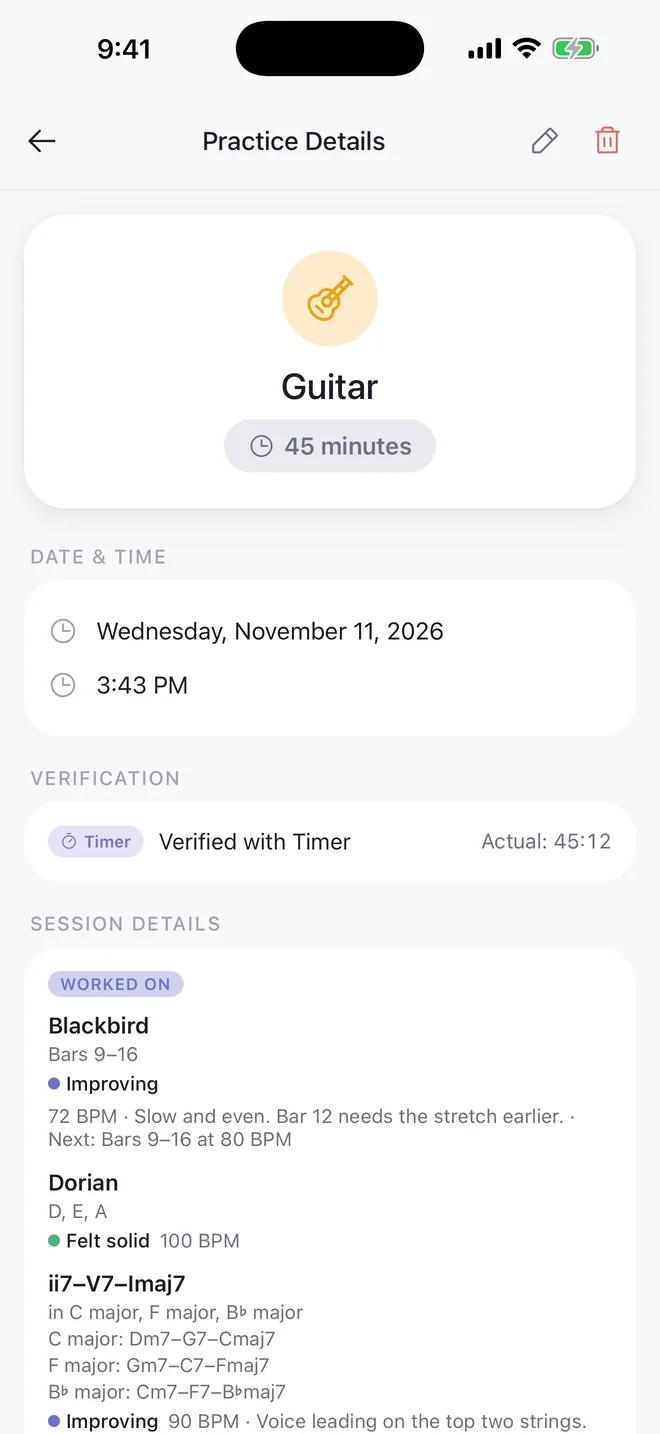
A practice timer tells you that you played for 30 minutes. A music practice journal tells you what those 30 minutes were: which piece, which scale in which key, at which tempo, and how it felt.
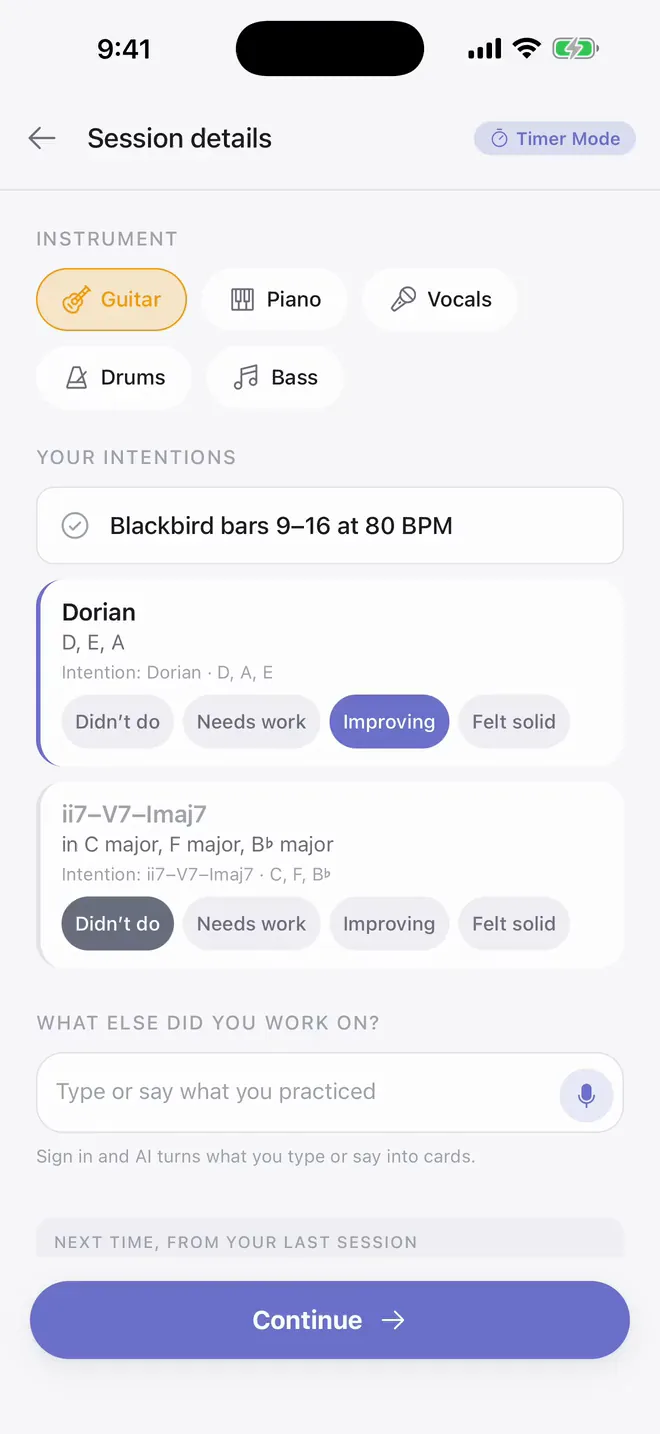
In LogLock, each thing you worked on is a card. A card takes a few taps, and none of it is required: you can always save a session with nothing but its duration.
Pieces and exercises
Log a piece with the part you worked on, like “Blackbird, bars 9–16”, or an exercise such as Hanon No. 1.
Scales and modes with their root
Not just “scales”, but D Dorian, A melodic minor or F♯ major. Practiced a pattern in every key? Pick all 12 roots at once.
Chords, changes and progressions
maj7, m7 or m7♭5 on the roots you played, chord changes like G ↔ D, and progressions such as ii–V–I in B♭ or a 12-bar blues in A.
Tempo and how it went
Add the tempo and your own impression to every card: Needs work, Improving or Felt solid. It's a note to yourself, not a test.
Techniques for your instrument
Fingerpicking and bending for guitar, paradiddles for drums, pedaling for piano, breathing for voice.
Reflection and next time
Rate mood, focus and comfort, note what went well, and leave one line for next time. It becomes an intention of your next session.
Logging
A few taps, not a form.
A journal only helps if you keep it, so logging has to be quick. LogLock remembers what you practice and never fills anything in behind your back: what you worked on lately is one tap away, and you decide what goes into today's entry.
With LogLock Pro you can skip the taps. Type or say what you worked on, in your own words, and AI turns it into cards for your pieces, scales, chords and progressions. You check each card before it is saved.
Continue where you left off
Your recent pieces, scales and progressions are offered as chips. “Add all from last time” brings back your whole last session.
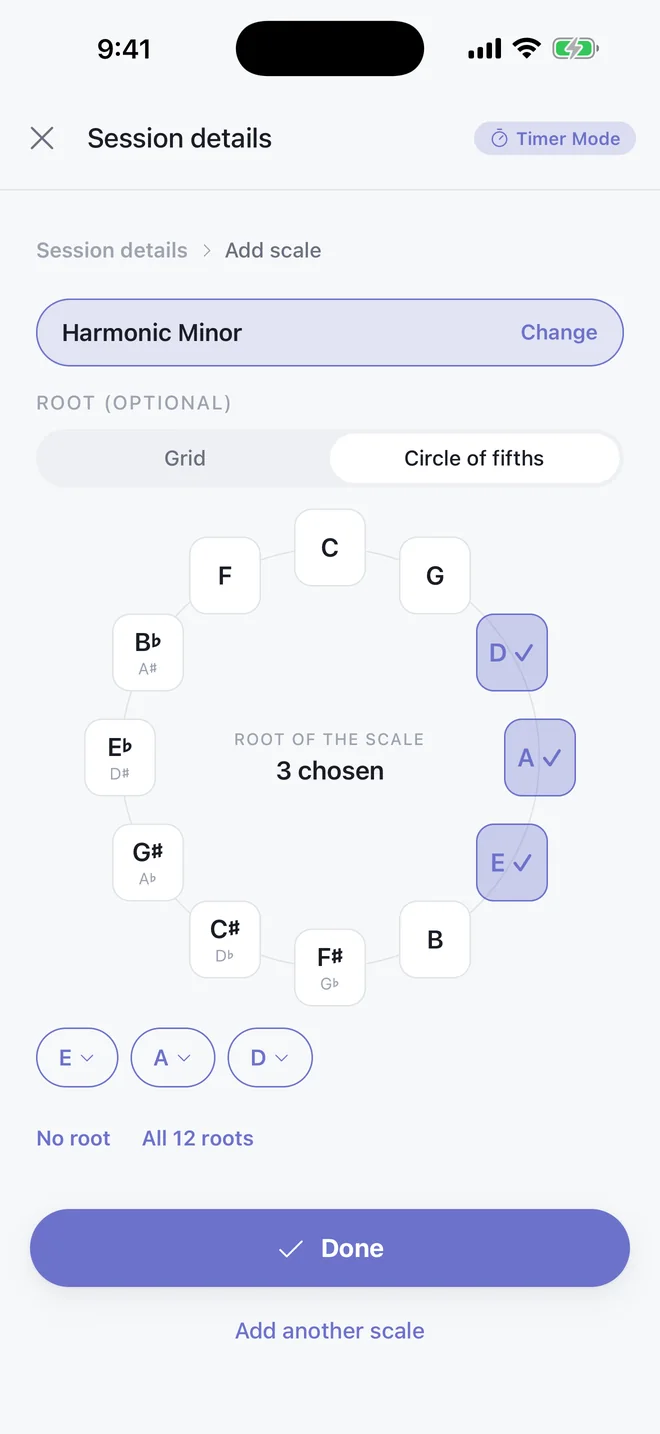
Grid or circle of fifths
Choose roots on a 12-note grid or on the circle of fifths, whichever matches how you think.
All modes at once
Practiced every mode of a scale? Add the modes of major, melodic minor, harmonic minor or harmonic major in one card.
Spelled the way musicians spell
C♯ stays C♯ and D♭ stays D♭. F♯ major contains E♯. German note names (H, B) are an option.
Your own progressions
Start from templates like ii–V–I, I–V–vi–IV or the 12-bar blues, or build your own, like i–♭VII–♭VI–V.
Add it later
No time after practice? Open the session in your history and add what you worked on whenever you like.
Timer sessions
A practice session, not just a stopwatch.
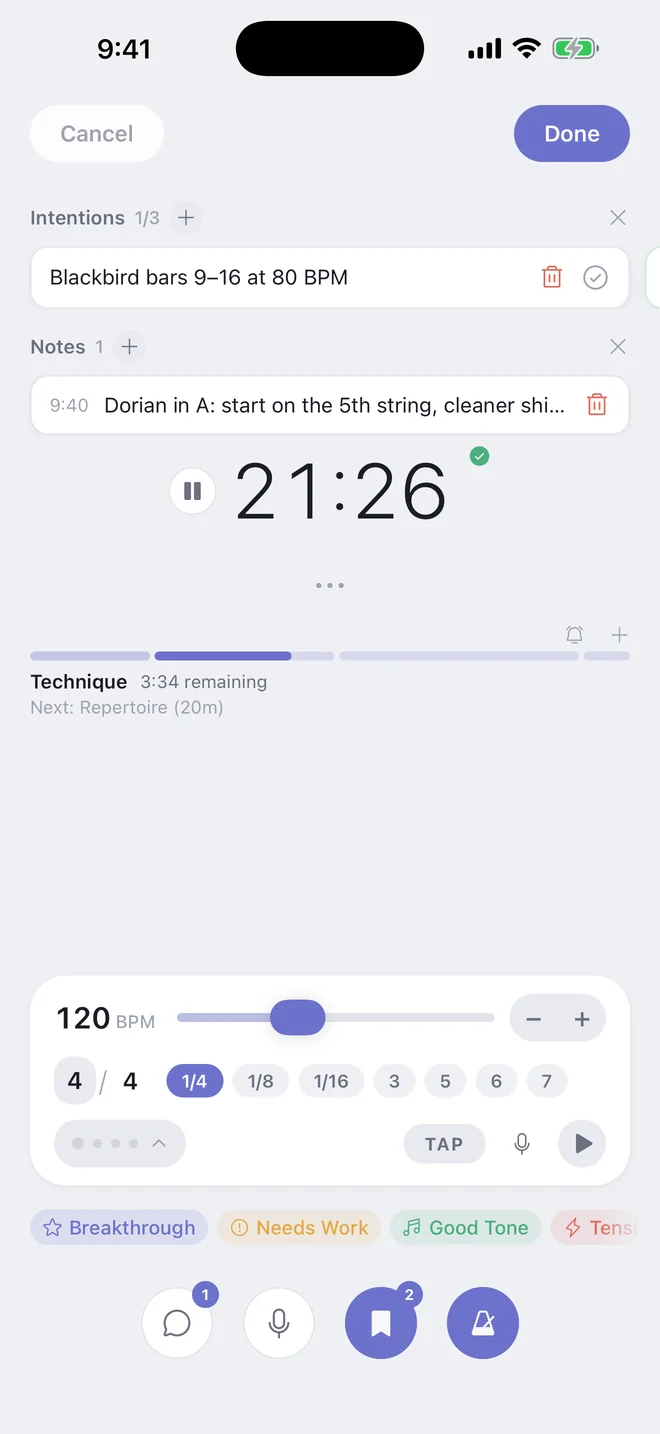
Start a session with the built-in timer and everything you need is one tap away, without stopping the clock. Whatever you do in the session lands in your journal entry: the segments you played, your notes, your tags and your recordings.
Intentions
Set up to three intentions, typed or taken from your recent practice. Check them off while you play, and their cards are ready to rate afterwards.
Session segments
Plan your session in blocks such as warm-up, technique, repertoire and cool-down. Your plan stays for next time, and you can save your own templates.
Metronome (Pro)
Set the tempo, add subdivisions, accent the beats you want and keep it running inside the session.
Recorder
Record clips while you play and listen back from your journal later. Recordings stay on your device and are never uploaded.
Looper (Pro)
Mark a start and end point in any recording and loop that passage until it sticks.
Notes and quick tags
Jot down thoughts, or tag moments with one tap: Breakthrough, Needs Work, Good Tone, Tension, Flow State.
Track your progress
Your practice, drawn as a musical map.
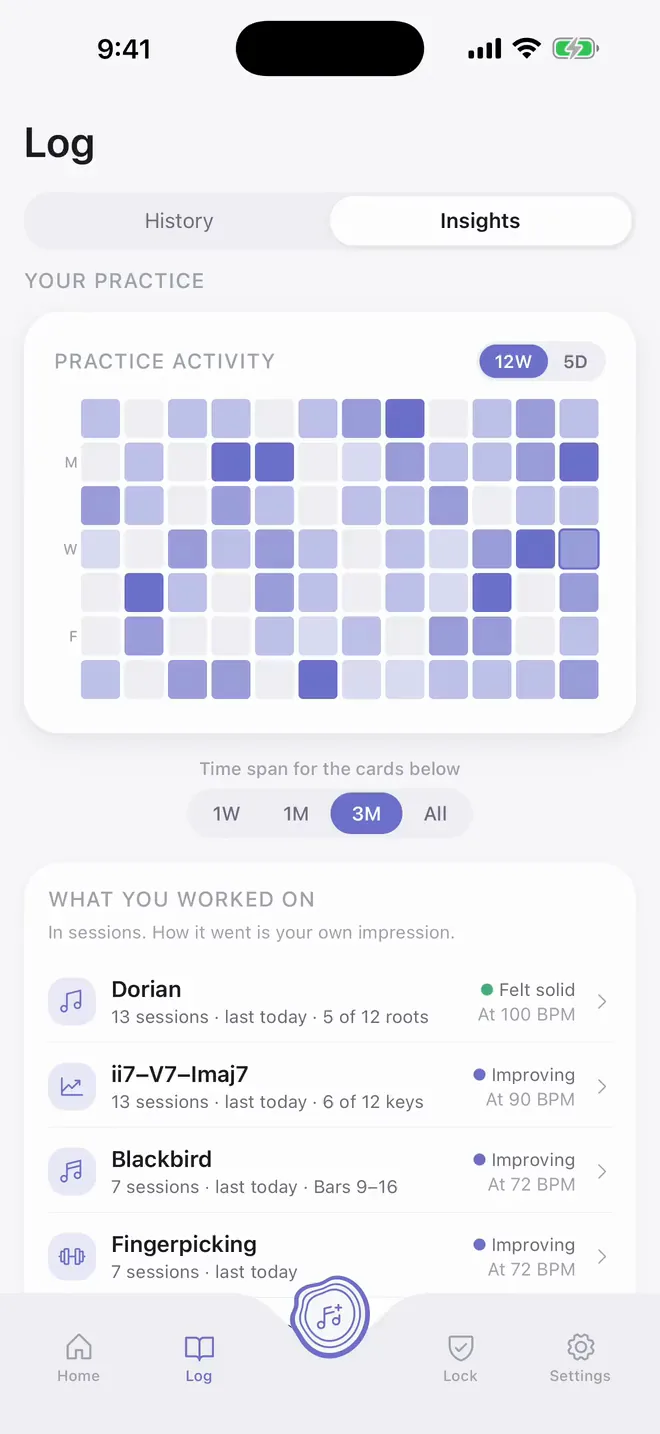
Your journal turns into a practice tracker on its own. Because LogLock knows what you played and not only how long, it can show where your practice time really goes: which scales you know in which keys, which pieces keep coming back, and where the gaps are.
Scale map
For each scale, the roots you've practiced light up on the circle of fifths. Five of twelve for Dorian? You know what to do next.
What you worked on
Every piece, exercise, scale and chord has its own page: its sessions, how it went over time, your tempi and the roots you covered.
Progressions and chord changes
See the keys you've played each progression in, and which chord changes you practice most.
Activity and streaks
A heatmap shows every practice day at a glance, and your streak grows on the home screen. No perfect record required.
Mood, focus and comfort
Trends from your reflections, focus against session length, and how many of your intentions you reach.
Search
Find any session by piece, scale, chord or note. Typing Bb, F#m7 or ii-V-I works too.
Instruments
One practice journal for every instrument.
Scales, chords and progressions are the same music on any instrument, so the journal works the same way for all of them. What changes is the technique list: LogLock offers the ones that fit what you play, and you can always add your own exercises.
Guitar practice journal
Strumming, fingerpicking, barre chords, bending, alternate picking and more, next to your songs, scales and chord changes.
Piano practice journal
Hand independence, fingering, pedaling and trills, plus pieces by section and scales in every key.
Drum practice journal
Single and double stroke rolls, paradiddles, flams, limb independence and fills, with tempo and time signature for every session.
Bass practice journal
Fingerstyle, slap and pop, muting and ghost notes, along with the progressions you play them over.
Vocal practice journal
Breathing and support, registers, diction and runs, and every song with the part you worked on.
Strings, winds and more
Bowing, shifting, tonguing, long tones and vibrato. With Pro you can also create your own practice types.
How to
How to keep a music practice journal.
A practice journal doesn't have to be long. Six short habits make it useful, whether you write on paper or log in LogLock.
Decide what to work on before you play
One to three intentions are enough: a passage, a scale, a tempo. In LogLock you set them when you start a session, typed or picked from your recent practice.
Write down what you played, not just how long
“30 minutes of guitar” says little. “Blackbird, bars 9–16” and “Dorian in D, A and E” tell you where to continue. In LogLock each of them is a card.
Note the tempo
Tempo is the easiest progress to measure. Write down the BPM you actually played, and raise it only when it feels easy.
Rate it honestly
Needs work, improving or solid: a quick self-rating shows over weeks what is getting better and what you keep avoiding.
Leave a note for next time
End every session with one line for the next one. LogLock shows it when you start again, so you never begin from zero.
Look back once a week
Skim your entries: which keys are missing, which piece hasn't moved? LogLock's insights and scale map answer that at a glance.
A paper notebook can do all of this. LogLock just makes it faster to write and much easier to look back.
Free template
Free printable music practice journal template.
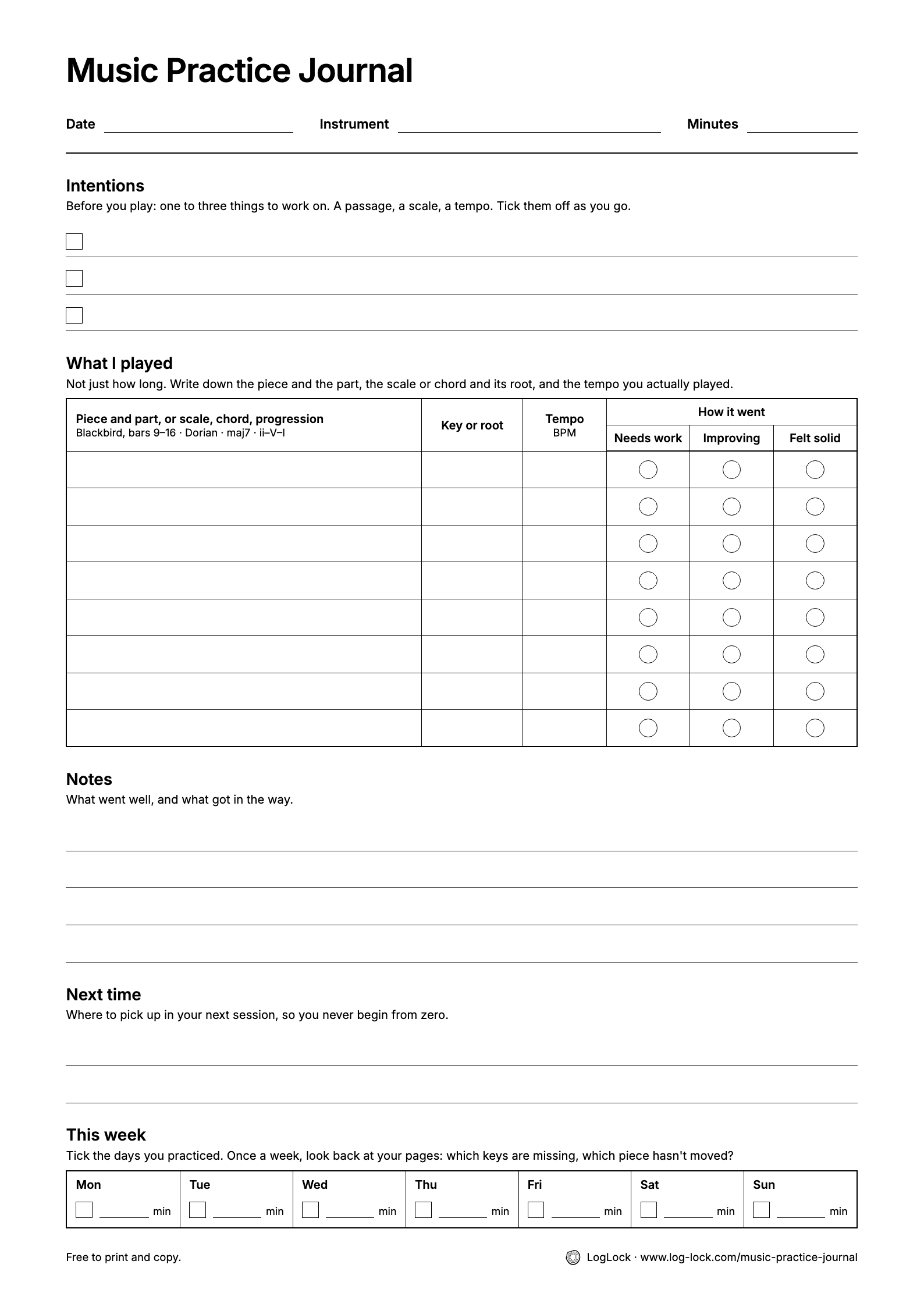
Prefer pen and paper? This one-page music practice journal template follows the six steps above. Print a sheet for every practice session, or copy it for your students.
- Date, instrument and minutes
- Up to three intentions to tick off
- What you played: the piece and the part, or the scale, chord or progression, with its key or root and the tempo
- A rating for every line: Needs work, Improving or Felt solid
- Notes, and where to pick up next time
- A weekly overview to tick the days you practiced
Free to print and copy. No sign-up, no email. Prints cleanly in black and white.
Why LogLock
More than a song list and a streak.
What a simple practice log usually records, and what LogLock records for every session.
| Feature | Simple practice log | LogLock |
|---|---|---|
| Song or piece, minutes, streak | ||
| The part of the piece you worked on | ||
| Scales, modes and chords with their roots | ||
| Progressions with their key | ||
| Tempo and your own rating for each item | ||
| Timer with segments, metronome, recorder and looper | ||
| Musical map: your roots per scale on the circle of fifths | ||
| Distracting apps locked until you've practiced | ||
| Say what you practiced and AI fills in the cards (Pro) |
Coming soon
What's next for the journal.
These are in development and not in the app yet.
Skill Tree
Earn XP across musical skills as you practice, and link your intentions to the skills they build.
Tuner and drone
Tune your instrument and practice intonation against a sustained reference tone without leaving LogLock.
Logging music details stays optional: you can always save a session without them, they don't affect your streak, and they're never required to unlock your apps.
FAQ
Practice journal questions.
What is a music practice journal?
A music practice journal is a record of your practice sessions: what you played, for how long, in which key and tempo, and how it went. Looking back at it shows where your practice time really goes and how you progress. LogLock creates a journal entry for every session you log.
What should I write in a music practice journal?
The pieces and the parts you worked on, the scales, chords and progressions with their keys, the tempo, a short rating of how it went, and one line about what to do next time. In LogLock each of these is a card you add in a few taps.
How do I keep a music practice journal?
Set one to three intentions before you play, write down what you played and at which tempo, rate it honestly, leave a note for next time and look back once a week. LogLock walks you through exactly these steps around every session.
Is there a free music practice journal template?
Yes. You can download a free printable music practice journal template on this page, as a PDF in A4 and US Letter, without signing up. The one-page sheet has room for the date and instrument, up to three intentions, what you played with its key, tempo and a rating, notes, a line for next time and a weekly overview.
Can I log scales, chords and chord progressions?
Yes. You log scales and modes with their roots, chords with their roots (also as arpeggios), chord changes like G ↔ D and progressions with their key, from templates such as ii–V–I or built yourself. Each card can carry a tempo, a note and your own rating.
Is LogLock also a music practice tracker?
Yes. Your journal feeds a practice tracker with daily streaks, an activity heatmap, a page for everything you worked on, key distribution, a scale map on the circle of fifths and mood trends over weeks and months.
Does it work for guitar, piano and drums?
It works for any instrument and for voice. You log each session by instrument, and LogLock offers techniques that fit it, such as fingerpicking for guitar, pedaling for piano or paradiddles for drums.
Is the practice journal free?
Yes. Logging with all music details, the timer with segments, recorder, notes and quick tags, intentions, reflection, insights and streaks are free with no time limit. LogLock Pro adds the metronome, the looper, the AI entry and more control over app blocking.
Can I say what I practiced instead of typing it?
Yes, with LogLock Pro. After a session you can speak for up to a minute or type a sentence, such as “ii–V–I in F and B♭, then the Dorian mode in D at 80”. AI turns it into cards for pieces, scales, chords and progressions, and you check them before they are saved. It needs an account and asks for your consent first.
Are my recordings uploaded?
No. Practice recordings stay on your device and are never uploaded. Without an account, your whole journal stays on your phone. The one exception is your choice: a voice note you record for the AI entry is sent to be transcribed, and LogLock keeps no copy of it.
More in LogLock
One app for the whole practice routine.
Practice tools
Timer with segments, metronome, recorder, looper, notes and quick tags, all inside your session.
Honor Tokens
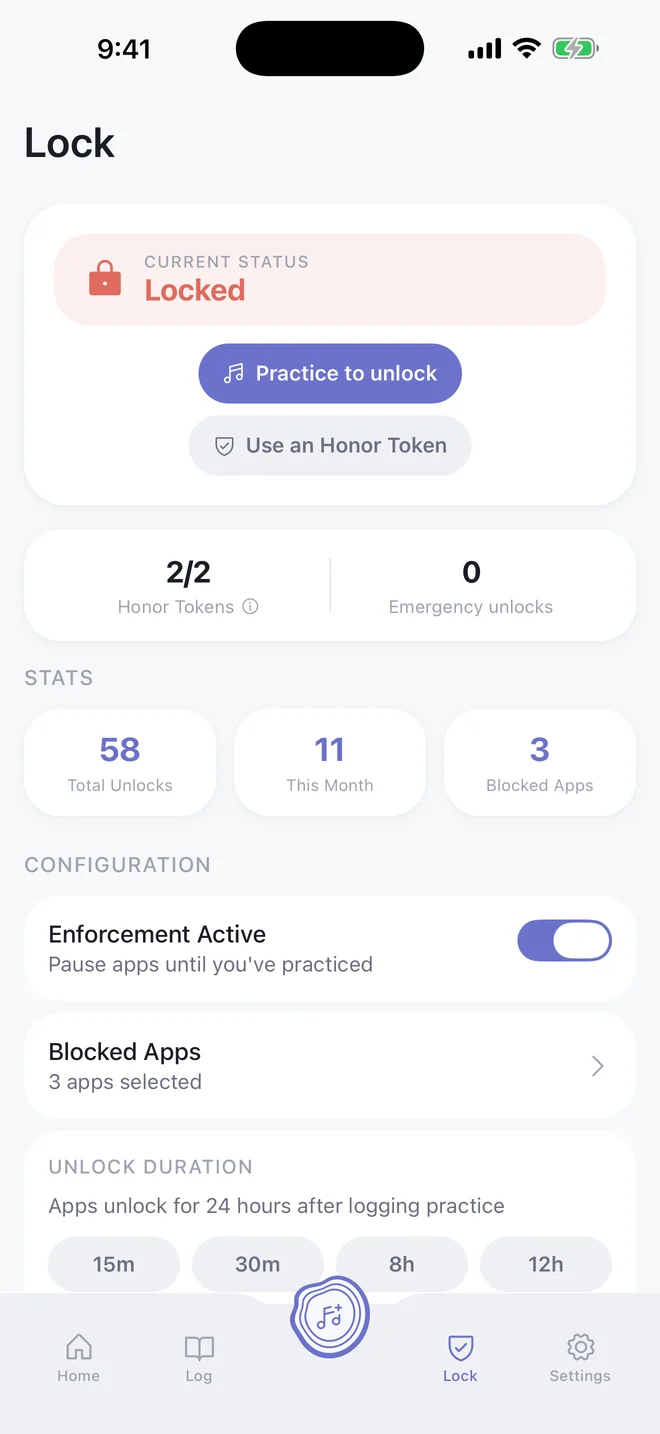
Two tokens a week for practice away from your phone or an emergency unlock. Stay locked in and earn one.
Free and Pro
The journal, timer sessions and app blocking are free. Pro adds the metronome, the looper and your own unlock window.
Start your practice journal today.
Log your next session and see your practice take shape.